
 Pressbook
All postsNote
Cloud books downsize the roll before the model sees it. Pressbook scores full-resolution originals on the phone. Same job. Different place the pixels go.
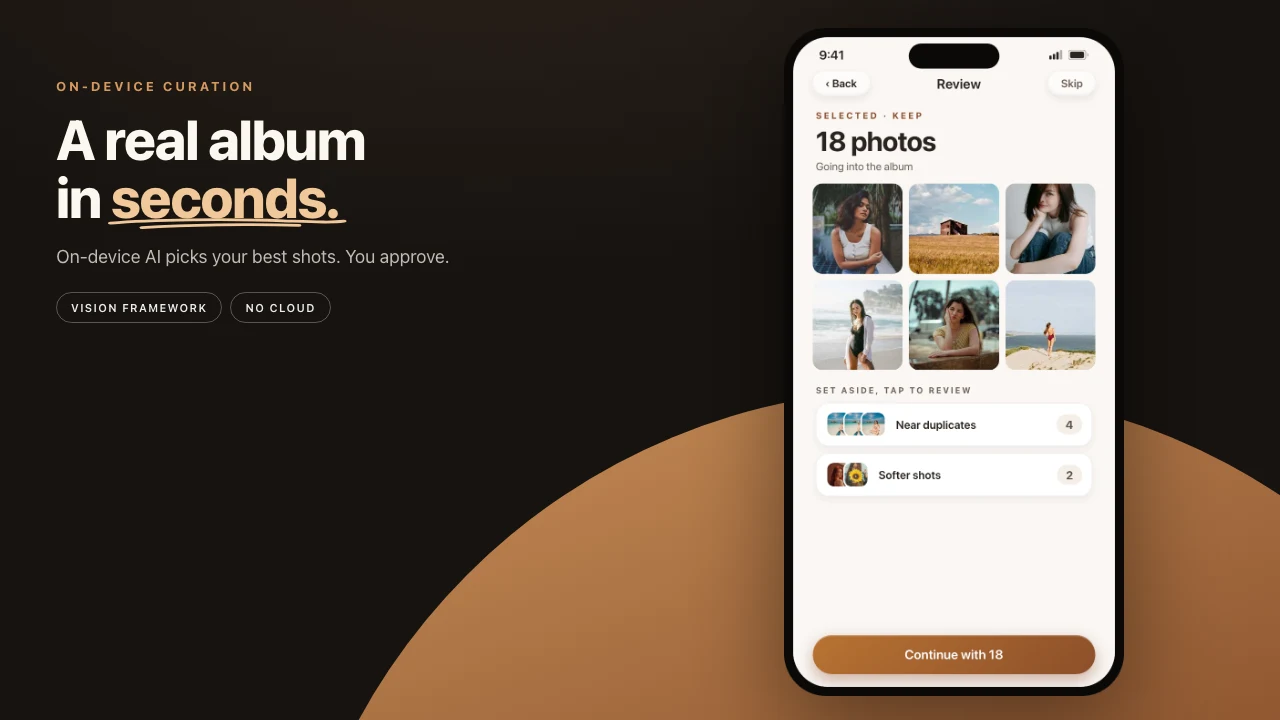
You just got back from a trip or a family weekend with 80 to 150 photos. A handful are genuinely special. A lot are near-duplicates of the same moment. A few blurry frames and a screenshot of the map snuck in. You want a book you can print, not another camera-roll scroll.
Most photo book apps give you the same first step: upload the photos. You hand over the originals. You wait through transfer and a server queue. By the time you see pages, the files have already left your control. Often downsized. Sometimes used to train a model.
Pressbook runs the other direction. Scoring, deduplication, chapters, layout, and the PDF all happen on the iPhone from the PhotoKit originals. The photos never leave the device to be curated.

What happens when the cloud sees the photos first
The moment you upload, most services (Mixbook, Chatbooks, Artifact Uprising, Shutterfly, Google Photos books, and peers) shrink the files before their AI looks. Fine detail in faces, subtle light, exact framing: gone. Curation happens on the compressed copy. There is no way back.
The uploaded originals often sit under a training clause. They live on remote disks exposed to breaches, subpoenas, and policy changes.
You wait in two queues: upload, then server. Typical end to end is several minutes, often 10 to 15 after the transfer.
Want a different cut? Re-upload and start over. The model never saw your actual pixels.
Named print-store comparison: Pressbook versus Mixbook, Chatbooks, and Artifact Uprising.
On-device versus cloud
| On-device (Pressbook) | Typical cloud book | |
|---|---|---|
| Analysis resolution | Full PhotoKit originals | Downsized on upload |
| Where AI runs | Vision on the Neural Engine | Remote servers after transfer |
| Time to first curated view | About 60 to 120 seconds on a recent iPhone | Upload plus server queue, often 5 to 15 minutes |
| Privacy | Photos never leave; FileProtectionType.complete | Uploaded, held, sometimes trained on |
| Dedup and scoring | dHash plus nine Vision requests on originals | On compressed versions |
| Chapters | Time, scene labels, saliency, face quality | Approximate, after compression |
| Review | Drawers you can edit; tap any photo back | Black box, or a limited re-edit |
| Layout | Fullness slider, then Another take, rebuilds on the device in seconds. There is no personality or tone picker. | Often locked to the first result |
| Export | PDF from originals at 300 DPI and up (Core Graphics) | From the uploaded, compressed assets |
| Offline | Analysis, layout, export | Internet required |
| Data exposure | None to a third party | Sent to the company, maybe others |
Nine Vision requests on the Neural Engine
Pressbook hands every selected photo to PhotoAnalyzer. Nine Vision requests fire on the Neural Engine. No network call. No account. The originals stay where they are, protected at FileProtectionType.complete: unreadable when the device is locked without your passcode.
The nine requests:
VNCalculateImageAestheticsScoresRequest(iOS 18 and later): composition, lighting, color, overall visual power, plus theisUtilityflag that skips screenshots and receipts.VNDetectFaceRectanglesRequest: every face.VNDetectFaceCaptureQualityRequest: per-face sharpness, exposure, framing.VNDetectFaceLandmarksRequest: closed eyes and awkward angles.VNGenerateAttentionBasedSaliencyImageRequest: where eyes land, for hero crops.VNClassifyImageRequest: scene labels for chapters.VNGenerateImageFeaturePrintRequest: a visual fingerprint for near-identical shots, and on each face, a print that groups photos of the same person.VNRecognizeAnimalsRequest: cats and dogs.VNDetectHumanRectanglesRequest: people's upper bodies, so crops keep them in frame.
Shots of the same moment stack up by perceptual hash (dHash) and fingerprint, and the album keeps the sharper one, or the one with eyes open. Time clustering plus scene signals make chapters that follow the day. How that clustering works, and how people get balanced across the book, is how Pressbook reads a camera roll.
An 80 to 150 photo set usually finishes in about a minute on a recent iPhone. You watch live progress: faces found, heroes promoted, quality percent climbing. No spinner waiting on a remote queue.
The request order, the coordinator, and how scores become drawers are on-device AI photo curation with Apple Vision.
The review you can edit
After the pass you get a breakdown from the analysis.
"50 kept, 16 set aside."
Tap the groups and you see why. Near duplicates: best burst frame kept via dHash plus quality. Softer shots: lower across several Vision signals. Less distinct: did not rise on the combined scores.
Tap any photo back in. Tap others out. Before the album is made, its last step lists what it will set aside and why, by group and count. The AI gave a first cut. You make the last call.
A technically weaker but important frame is less likely to vanish by accident, because the scores came from the PhotoKit original. A cloud pass, working from a downsized upload, cannot make the same call.
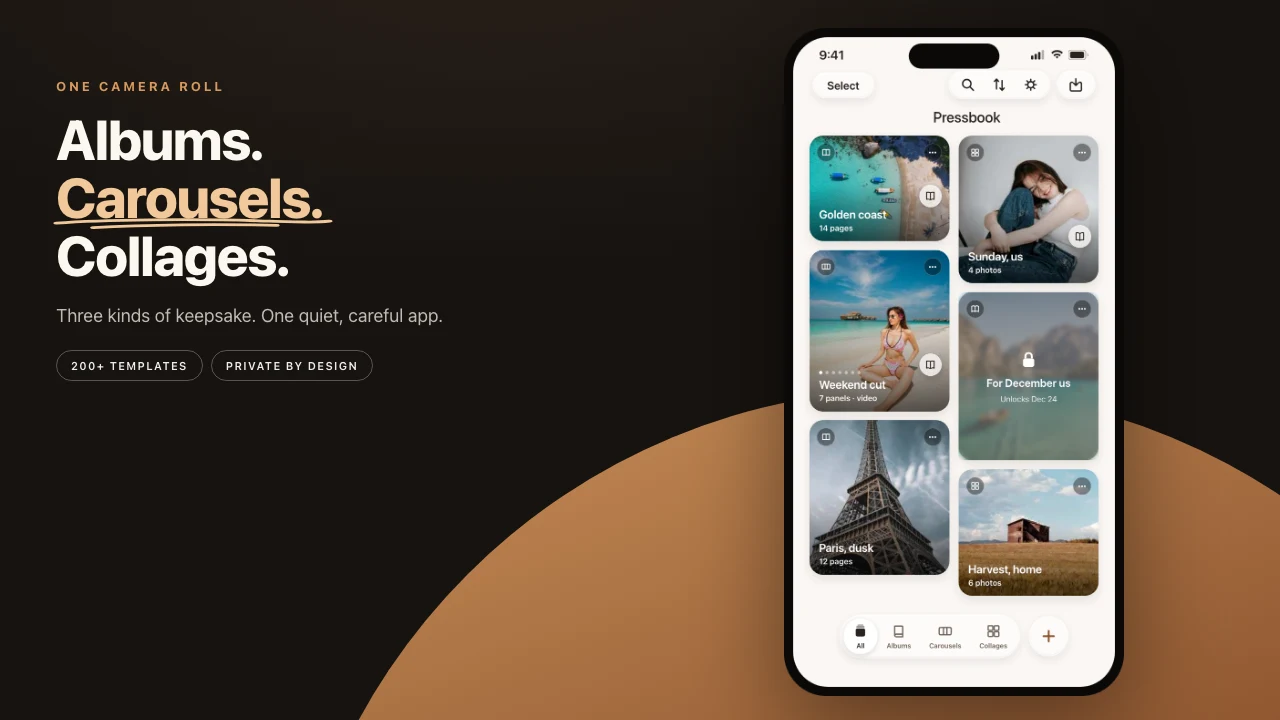
Rebuild, edit later, export from originals
Before pages appear you set fullness. The engine derives the look. Hate the first result? Try Another take. The pages rebuild in seconds on the device from the same photo choices. Cloud flows often treat the first AI output as the only practical one.
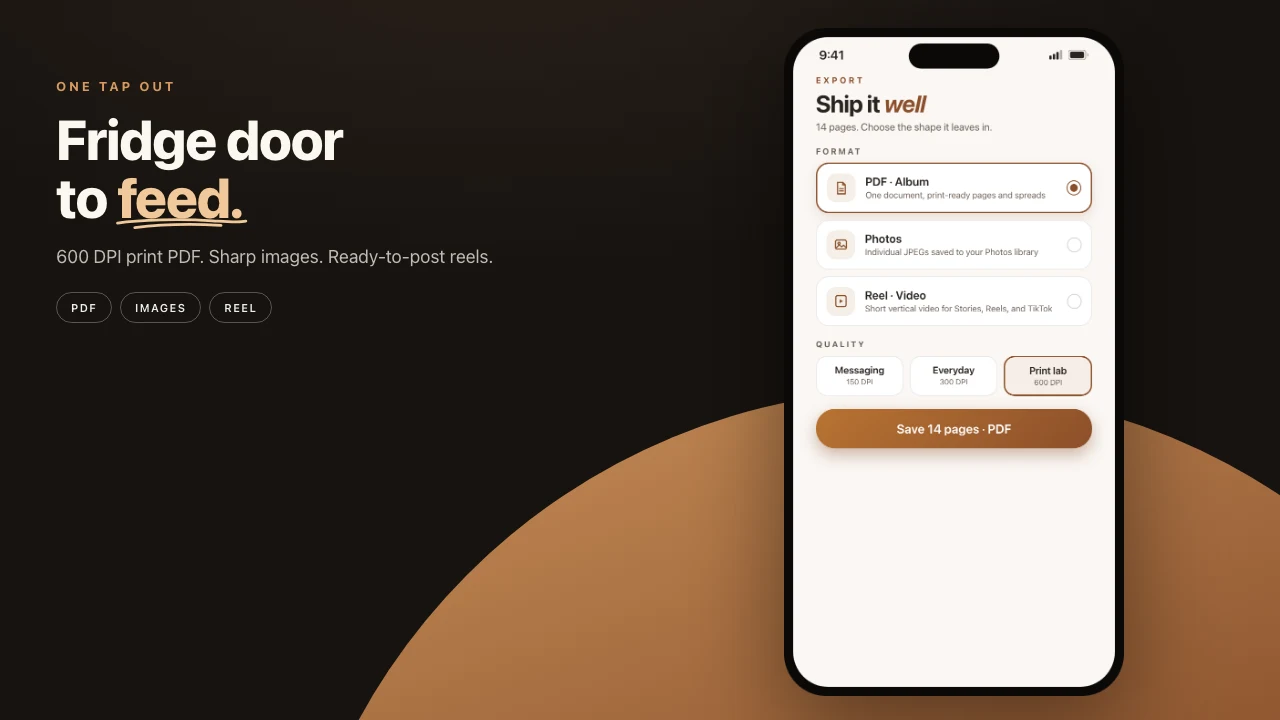
You can still hand-edit a page, swap photos, add text, stickers, or drawings. The project file stays local. Weeks later you reopen it and export at 300 DPI for most labs, or at Archive quality for the largest file.
The printer gets a PDF rendered from the original full-resolution images on the phone. Core Graphics. Atomic write.
The sequence is how to make a photo book on iPhone.
File protection, no upload
Scoring never copies the weekend onto a remote disk. There is no training set and no company inbox holding the originals.
Storage uses iOS FileProtectionType.complete. When locked, the .pressbook project and assets are unreadable without the device passcode. AES-256 keys in Apple's hardware.
Where cloud services still have an edge
Cloud tools win if you want automatic multi-device access, huge shared libraries without moving files, or easy collaboration with people who do not have the app. Some, Mixbook's iOS app among them, now use Apple's on-device frameworks for an initial analysis. The full creative output and the print still require uploading the (often compressed) files to their servers.
Pressbook trades those conveniences for privacy and quality end to end. You move the project yourself with AirDrop, iCloud Drive, or any service you already trust. The PDF you export was never seen by anyone else.
Run the same photos both ways
Grab 80 to 120 real shots from the last trip or event.
Run them through a popular cloud photo book service. Upload first. Wait for their AI.
Then run the identical set through Pressbook. Zero upload.
Watch:
- Total time from start to first finished album. Upload plus wait, versus a local pass of about a minute.
- Which photos survived, and whether the keepers feel right. Full-res signals versus compressed.
- How the pacing and chapters read. Does it feel like the day you lived?
- What you can still change without starting over.
- Export quality when you zoom or print. Originals versus uploaded copies.
Make an album. Free, no account, nothing uploaded.
