
 Pressbook
All postsNote
Nine Vision looks per photo on the Neural Engine. Chapters from time and place, an offline atlas for the cover. Bursts collapse to one lead. Nothing leaves the phone.
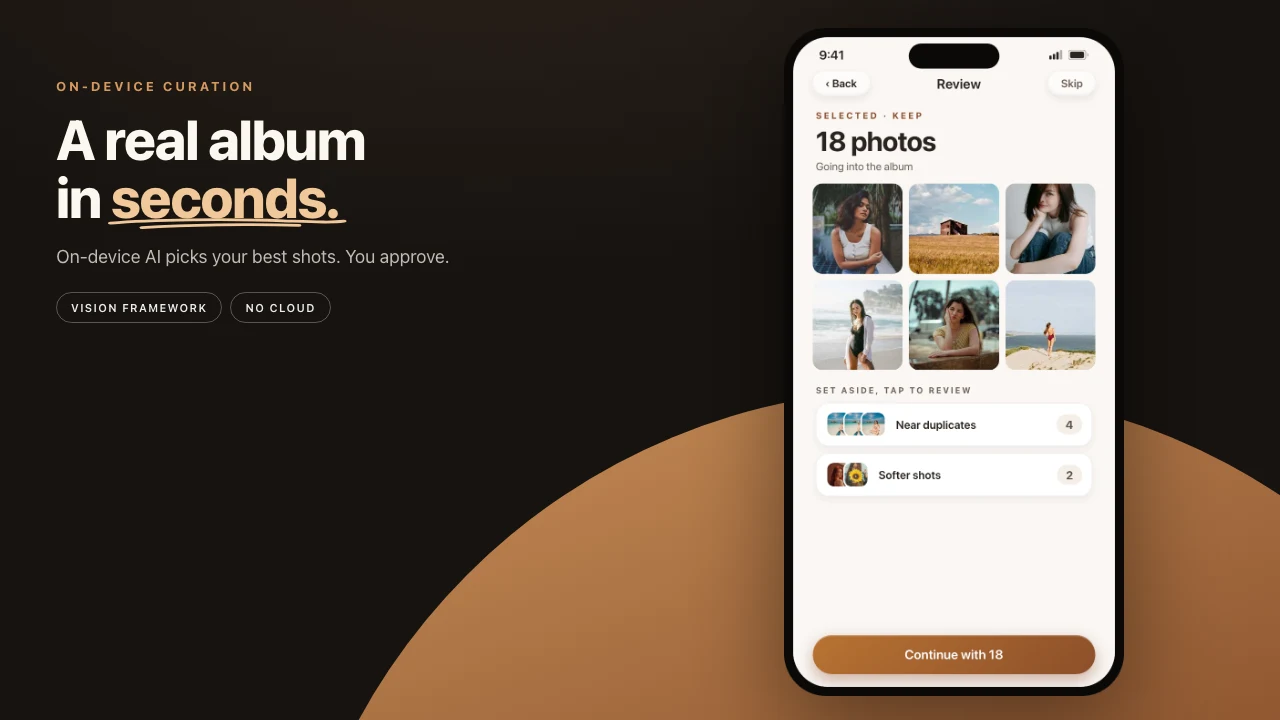
Hand a professional a shoebox of prints and they do something specific. They sort by when and where. They pull the best frame from every near-identical cluster. They make sure the important people show up throughout. They never crop through a face.
Pressbook does the same work, in the same order, on the phone. This is the pipeline, in order.

Nine looks at every photo
The pass starts with on-device curation, now grown to nine Vision framework requests per photo: faces, facial landmarks for eyes-open checks, capture quality, scene classification, saliency, aesthetic scoring, a visual fingerprint, animal recognition (pets count here), and people's upper bodies, so crops keep them in frame.
Each request runs in 30 to 100 milliseconds on the Neural Engine. No photo leaves the device to be understood. Free albums stop at 20 photos. Pro raises the cap to 1,000. The same on-device pass either way. No account.
Chapters, with the atlas built in
Photos cluster into chapters by time and place. The time half is straightforward. The place half usually is not, because turning coordinates into “Lisbon” is a service most apps rent from a server, which means telling that server where you were.
Pressbook ships its own gazetteer inside the app: a compact offline atlas the engine consults locally. Location helps group the chapters and gives a trip's days their local time, while your location history stays yours. The place names themselves print on the album's cover, under the title, named on the device. Even in airplane mode, the cover still knows where the trip went.
The best of every burst
Nine near-identical frames of the same toast should not become nine album slots. The engine stacks shots of the same moment: frames taken minutes apart whose visual fingerprints agree, with the same people in them. Then it picks a lead the way a photographer would: open eyes first, sharp subject, good exposure, then aesthetics.
The lead goes on the page. The rest of the stack waits in Set aside, one tap away, and you see the count before the album is made. If the engine chose the frame where your father blinked, the fix is a swap, not an argument.
People, balanced
Across a whole album, the engine tracks who appears and spaces them out, so the person who happened to sit near the camera does not dominate page after page. The layout math treats faces as sacred: a face is never cropped by a template, whatever the layout wants.
Baby albums and memorial albums are recognized from the photos themselves and set quieter, automatically. A loud layout is the wrong instinct for both.
Made entirely on this device
Every stage above is something cloud photo products do on a server: face grouping, place lookup, duplicate detection, quality scoring. The comparison has its own post.
Pressbook's version of the pipeline has no server in it. The closing page of an album states the result in one line: made entirely on device with Pressbook.
It proposes. You dispose.
The engine’s judgment is good, and when it is not, everything is reversible. Swap the burst frame. Add a shot back from Set aside. Flip to another take. The sequence around that pass is how to make a photo book on iPhone.
Start an album and watch it read your roll. Free, no account, nothing uploaded. iPhone and iPad, iOS 18 and up.
